CLAUDE WATERMARK REMOVER · PRACTICAL TEST
Does removing a zero-width space insert an ordinary space?
No. This cleaner deletes the selected code point without adding a separator. In our fixtures, red + U+200B + blue becomes redblue. Decide from context whether the intended repair is deletion or replacement.
Open the Claude text cleaner · Full measured data
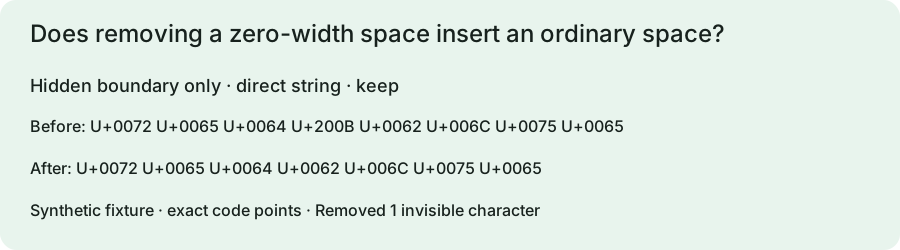
Measured inputs and outputs
These are locally constructed test strings, not evidence that Claude inserts these characters. We executed the saved homepage script snapshot with a minimal DOM harness and compared exact strings. Invisible removal is enabled; the dash mode appears in each row. The observations below test this page's specific question. We make no detector-score or statistical-watermark removal claim.
| Fixture and mode | Input string and code points | Output and cleaner status | Observed before / after |
|---|---|---|---|
| Hidden boundary only direct string / keep | "redblue"U+0072 U+0065 U+0064 U+200B U+0062 U+006C U+0075 U+0065 | "redblue"Removed 1 invisible character | {"wordsByAsciiSpace":["redblue"],"asciiSpaces":0,"equalsRedBlue":false}{"wordsByAsciiSpace":["redblue"],"asciiSpaces":0,"equalsRedBlue":false} |
| Ordinary space already present direct string / keep | "red blue"U+0072 U+0065 U+0064 U+200B U+0020 U+0062 U+006C U+0075 U+0065 | "red blue"Removed 1 invisible character | {"wordsByAsciiSpace":["red","blue"],"asciiSpaces":1,"equalsRedBlue":false}{"wordsByAsciiSpace":["red","blue"],"asciiSpaces":1,"equalsRedBlue":true} |
| Split identifier direct string / keep | "account_id"U+0061 U+0063 U+200B U+0063 U+006F U+0075 U+006E U+0074 U+005F U+0069 U+0064 | "account_id"Removed 1 invisible character | {"wordsByAsciiSpace":["account_id"],"asciiSpaces":0,"equalsRedBlue":false}{"wordsByAsciiSpace":["account_id"],"asciiSpaces":0,"equalsRedBlue":false} |
| Word joiner without space direct string / keep | "redblue"U+0072 U+0065 U+0064 U+2060 U+0062 U+006C U+0075 U+0065 | "redblue"Removed 1 invisible character | {"wordsByAsciiSpace":["redblue"],"asciiSpaces":0,"equalsRedBlue":false}{"wordsByAsciiSpace":["redblue"],"asciiSpaces":0,"equalsRedBlue":false} |
Four inputs, two different repair intentions
The first fixture becomes redblue, with zero ordinary spaces before and after. The second becomes red blue because its existing U+0020 remains. The third becomes account_id, which is the useful repair if the character accidentally interrupted an identifier. The fourth also becomes redblue because U+2060 is deleted. These results come from the actual homepage script with invisible removal enabled and dashes kept. No operation in that script inserts a word boundary in response to these removals.
An invisible character is not automatically a missing space
U+200B can represent a line-break opportunity; U+2060 can suppress one. Unicode Annex #14 describes line-breaking behavior, not an instruction to replace every such character with ASCII space. A split identifier and two adjacent words require different editorial decisions. The measured outputs establish how this cleaner behaves on our fixtures, but they do not establish how a reader or a language tokenizer should divide arbitrary text. We did not run language segmentation or record samples from Claude.
Check the neighboring text before accepting the output
Keep the original and inspect the immediate context around each removal. For an identifier, URL component or spelling fragment, deletion may be the desired operation. For two distinct English words, insert an ordinary space deliberately after checking the sentence. For languages that do not separate every word with spaces, avoid automatic replacement assumptions. Compare the repaired passage in its destination editor. This homepage has no boundary inference, dictionary or replacement preview; its character count reports deletion only. A smaller count can coexist with a new readability problem.
Reproduce this test
Save reproduce.cjs and tested-app.js in the same folder. Run the command below with Node.js. The harness prints its runtime, script SHA-256 and every measured row. Compare those rows with the original record. Using a newer script or runtime creates a new experiment; retain the version information with your rerun.
node reproduce.cjsReference and next check
Unicode line breaking provides the relevant primary definition. The table and fixture analysis are original measurements. For broader inspection, use our Unicode inspector. Read the scope distinction before interpreting cleanup as a watermark result.