CLAUDE WATERMARK REMOVER · PRACTICAL TEST
Why does a CSV column look right but fail a header match?
A hidden code point can be part of the header. Our fixtures show that deleting U+200B repairs an exact email match, while a non-breaking space remains. Inspect parsed header values and check for collisions.
Open the Claude text cleaner · Full measured data
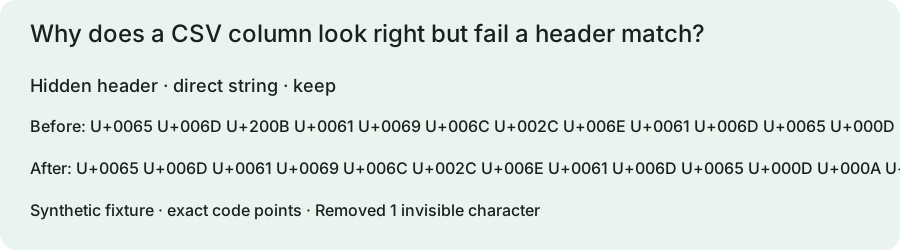
Measured inputs and outputs
These are locally constructed test strings, not evidence that Claude inserts these characters. We executed the saved homepage script snapshot with a minimal DOM harness and compared exact strings. Invisible removal is enabled; the dash mode appears in each row. The observations below test this page's specific question. We make no detector-score or statistical-watermark removal claim.
| Fixture and mode | Input string and code points | Output and cleaner status | Observed before / after |
|---|---|---|---|
| Hidden header direct string / keep | "email,name\r\na@example.com,Ada"U+0065 U+006D U+200B U+0061 U+0069 U+006C U+002C U+006E U+0061 U+006D U+0065 U+000D U+000A U+0061 U+0040 U+0065 U+0078 U+0061 U+00 … | "email,name\r\na@example.com,Ada"Removed 1 invisible character | {"headers":["email","name"],"emailIndex":-1,"distinctHeaders":2,"headerCount":2,"recordBreaks":1}{"headers":["email","name"],"emailIndex":0,"distinctHeaders":2,"headerCount":2,"recordBreaks":1} |
| Non-breaking space header direct string / keep | "email ,name\r\na@example.com,Ada"U+0065 U+006D U+0061 U+0069 U+006C U+00A0 U+002C U+006E U+0061 U+006D U+0065 U+000D U+000A U+0061 U+0040 U+0065 U+0078 U+0061 U+00 … | "email ,name\r\na@example.com,Ada"No selected invisible characters found | {"headers":["email ","name"],"emailIndex":-1,"distinctHeaders":2,"headerCount":2,"recordBreaks":1}{"headers":["email ","name"],"emailIndex":-1,"distinctHeaders":2,"headerCount":2,"recordBreaks":1} |
| Two headers become one direct string / keep | "email,email\r\na@example.com,b@example.com"U+0065 U+006D U+0061 U+0069 U+006C U+002C U+0065 U+006D U+200B U+0061 U+0069 U+006C U+000D U+000A U+0061 U+0040 U+0065 U+0078 U+00 … | "email,email\r\na@example.com,b@example.com"Removed 1 invisible character | {"headers":["email","email"],"emailIndex":0,"distinctHeaders":2,"headerCount":2,"recordBreaks":1}{"headers":["email","email"],"emailIndex":0,"distinctHeaders":1,"headerCount":2,"recordBreaks":1} |
What the three CSV fixtures measured
The first header is em + U+200B + ail. Before cleanup an exact lookup for email returns -1 in our small test reader. After cleanup it returns 0. The second header ends in U+00A0, which is outside the homepage removal set; the exact lookup still fails. In the third fixture, the two different header strings become identical email strings. The number of columns remains two, but the number of distinct header names drops to one. These are different failure modes that a single removal count cannot distinguish.
Read the test scope correctly
Our fixture reader splits deliberately simple, unquoted ASCII-comma records. It is not a general CSV parser. The saved inputs include CRLF record breaks; the cleaner retains those breaks and commas in all three cases. We did not test Excel, Google Sheets, quoted multiline fields, delimiter detection, or an import service. A production workflow must use its real CSV parser first and inspect the resulting field names. RFC 4180 describes quoting for embedded commas, quotes and line breaks, which a simple split cannot handle.
Repair the field, then validate the import
Compare each decoded header with the schema expected by the destination. Show the header code points, not just the visible label. If a hidden character is accidental, rename that one header and rerun duplicate-name checks. For an intentional non-breaking space, decide whether the schema should preserve it or map it to an ordinary space. Verify that every record still has the expected number of fields and that identifiers remain unchanged. The cleaner does not choose a winning duplicate column, validate email addresses or convert CSV to a structured table. Cleaning a whole file blindly can modify data cells as well as headers.
Reproduce this test
Save reproduce.cjs and tested-app.js in the same folder. Run the command below with Node.js. The harness prints its runtime, script SHA-256 and every measured row. Compare those rows with the original record. Using a newer script or runtime creates a new experiment; retain the version information with your rerun.
node reproduce.cjsReference and next check
CSV records and quoting provides the relevant primary definition. The table and fixture analysis are original measurements. For broader inspection, use our Unicode inspector. Read the scope distinction before interpreting cleanup as a watermark result.